ruah map
See the architecture of any repo, code and cloud, right inside Claude Code.
What does this system actually look like?
ruah map is a Claude Code plugin. Type /ruah:map and a map of your system opens above the prompt: packages and modules, the services they call, the infrastructure they deploy to, and the CI that ships them. Claude then explains it: what each part does, how requests flow through it, and where the risks are.
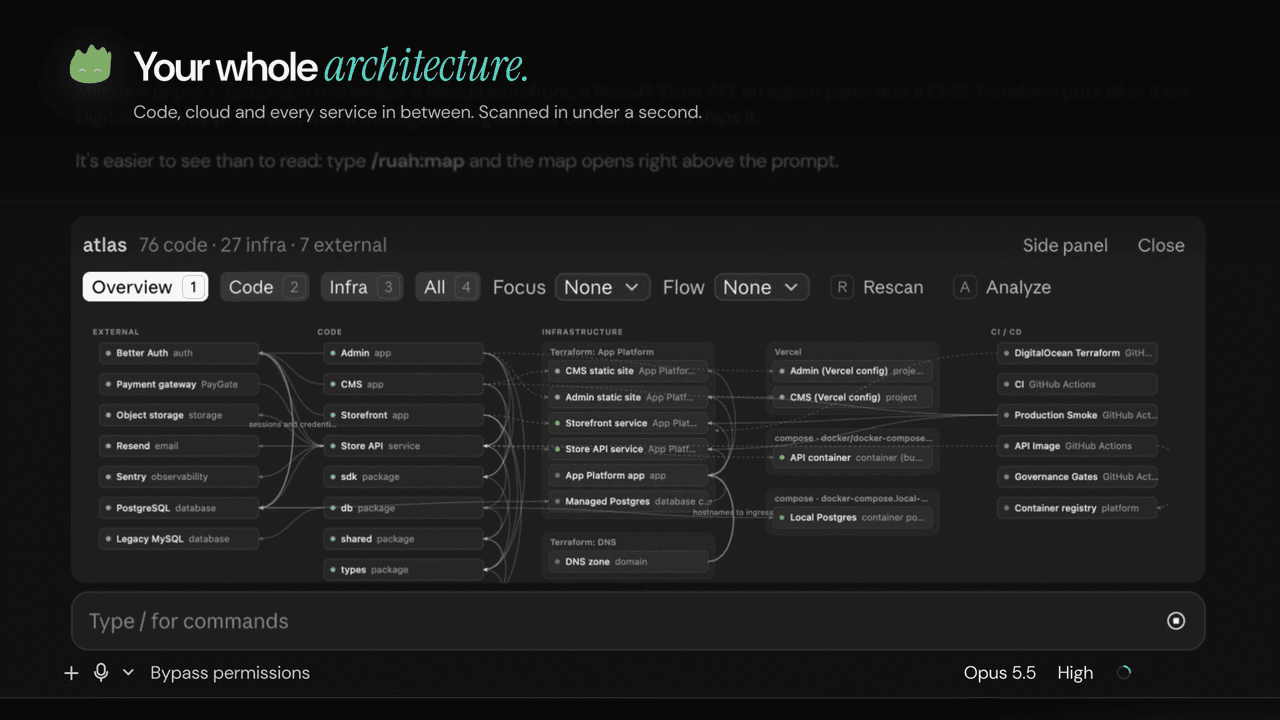
It has two parts:
- The
/ruah:mapskill. Scans the repo, lets Claude add descriptions, flows and risks, then shows the map. It also works on claude.ai and in Cowork, where the map opens as an Artifact. - The
/ruahmod. A Claude Code mod that draws the map instantly, with no model call, in a band above the prompt or in a docked side panel.
Source, issues and releases: github.com/ruah-dev/ruah-map. The launch video is attached to the v1.0.0 release.
What you get
- One command.
/ruah:mapscans the repo locally in about a second. The map itself needs no model call. - Code and cloud on one map. Packages, modules and their imports next to Terraform, Kubernetes, Docker Compose, Cloudflare, Vercel, Netlify, Fly, Railway, Render, Firebase, Supabase and CI/CD.
- Inside Claude Code. The map lives above the prompt or in a side panel. One click moves it, and the choice is remembered. The terminal gets the same view as an outline.
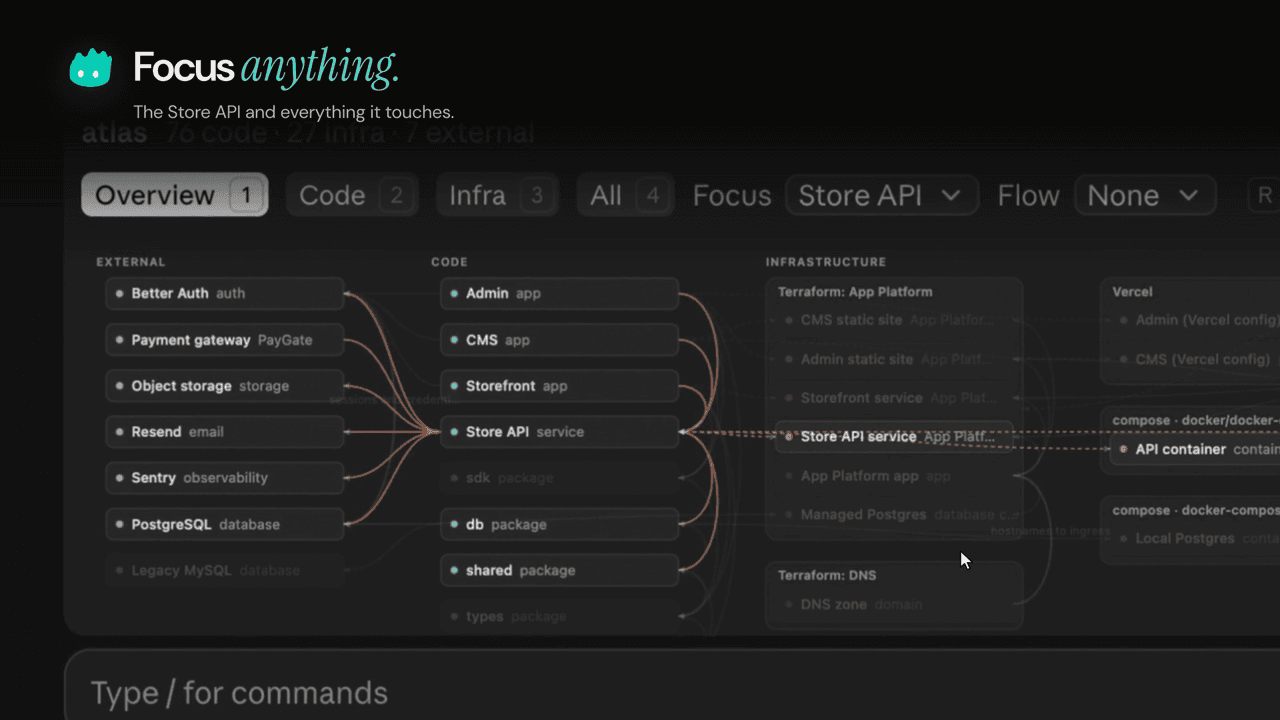
- Focus and flows. Pick any component to light up everything it touches.
/ruah:map deephas Claude trace the main flows step by step (checkout, sign-in, deploy) and write up risks. - Drift, read-only.
/ruah:map live aws(orgcp,azure,k8s) compares what the repo declares with what is actually deployed, using list/describe calls only.
Install
In Claude Code:
/plugin marketplace add ruah-dev/ruah-map
/plugin install ruah@ruah
Or from your shell:
claude plugin marketplace add ruah-dev/ruah-map
claude plugin install ruah@ruah
Requirements
python33.9 or later. The scanner uses the standard library only.- The in-app map (the
/ruahmod) needs Claude Code 2.1.287 or later, where mods are on by default. - On claude.ai and in Cowork, the
/ruah:mapskill works and shows the map as an Artifact. The mod is Claude Code only.
Commands
| Command | What it does |
|---|---|
/ruah:map | Scan, add a short explanation, show the map |
/ruah:map code · /ruah:map infra | Open on the Code or Infra view |
/ruah:map deep | Full analysis: descriptions, code↔infra links, flows and risks |
/ruah:map live aws | Add read-only cloud discovery and drift (gcp, azure, k8s too) |
/ruah:map md | Also write a Mermaid ARCHITECTURE.md at the repo root |
/ruah:map quick | Scan and show, no enrichment by Claude |
/ruah:map refresh | Rescan and repair the existing enrichment |
/ruah:map open | Show the existing map again, no rescan |
/ruah | Instant map from the mod, no model call (/ruah code, /ruah infra, /ruah all open on that view) |
/ruah side · /ruah above · /ruah close | Move the map to the side panel, back above the prompt, or close it |
/ruah deep · /ruah live aws · /ruah md | Open the map and hand the analysis to Claude (runs the skill) |
Any command also takes a repo path as its last word. The default is the current directory.
The /ruah mod
The mod is the fast path. /ruah runs the bundled scanner and draws the map straight into the app. Claude is not involved until you ask for an analysis.
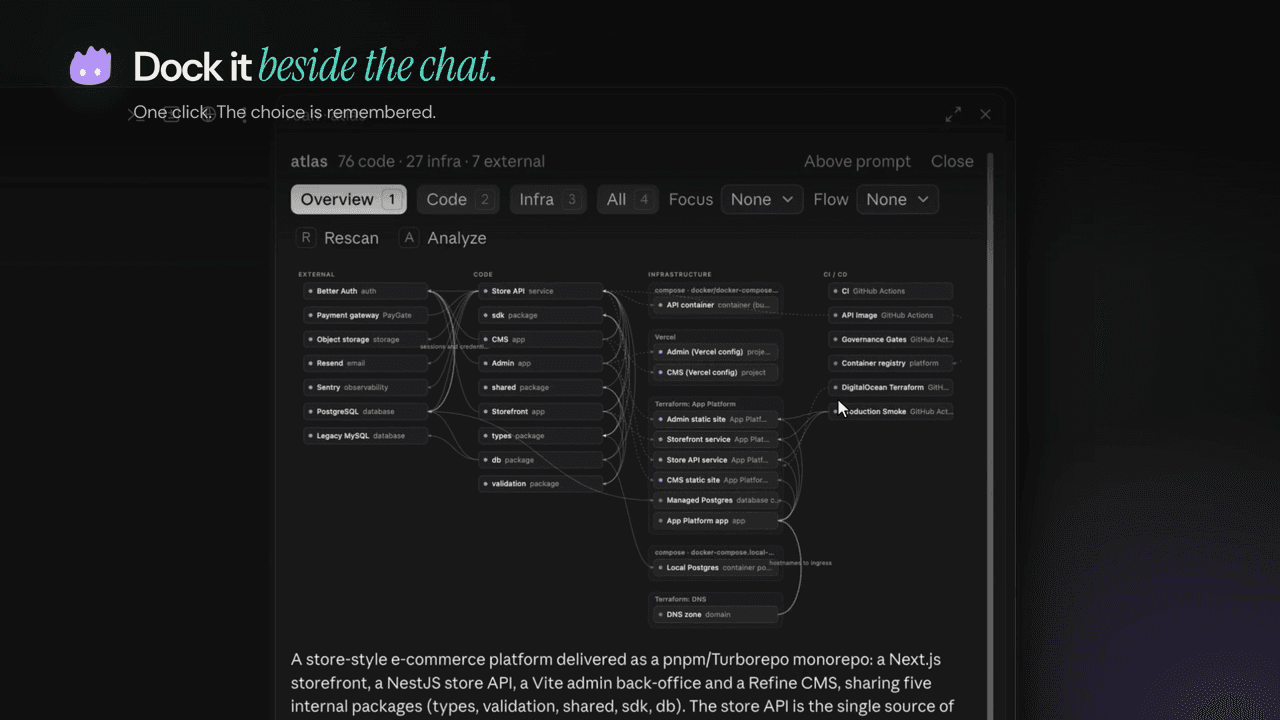
Band or side panel. By default the map sits in a band above the prompt, drawn wide and short. Side panel docks it beside the chat with the full layout, the summary and the insights. Above prompt moves it back. The mod remembers where you last put it.
Views. Overview, Code, Infra and All, on hotkeys 1 to 4.
Focus and Flow. The Focus selector picks one component and dims everything it does not touch, then shows that component's description. The Flow selector (after /ruah deep) highlights one traced flow and lists its steps.
Rescan and Analyze. Rescan (r) runs the scanner again and redraws. Analyze (a) is the same as /ruah deep: it submits a prompt asking Claude to run the full analysis, then the map refreshes when it is done.
The mcp__ruah__show tool. The mod registers one tool, mcp__ruah__show, with inputs path, view and rescan. The skill calls it after writing .ruah/enrich.json so the map in the app picks up Claude's descriptions, flows and insights. It redraws the map and returns one line of text to Claude. It is a new tool and does not replace a built-in one.
Deep, live and md
- deep delegates to the
ruah-analystagent, which reads the key files and writes.ruah/enrich.json: a summary, a description per component, code↔infra links, flows and insights. Large repos (more than about 300 source files or 8 packages) get this treatment by default. - live adds read-only cloud discovery and drift for
aws,gcp,azureork8s(comma-separated for several). Before anything else it shows which account or context will be read and waits for your yes. Details below. - md also writes
ARCHITECTURE.mdat the repo root, with Mermaid diagrams you can commit.
All output goes to <repo>/.ruah/, which ignores itself in git. Besides the files the mod uses, the skill writes architecture.html, a standalone map you can open in a browser.
What the scanner understands
| Area | Detected |
|---|---|
| Code | package.json, pyproject, requirements, go.mod, Cargo, Maven/Gradle, composer, Gemfile, .csproj; workspaces and monorepos; import graphs for JS/TS (incl. tsconfig paths), Python and Go; frameworks; entrypoints |
| External services | About 100 SDKs (Stripe, Supabase, Firebase, AWS/GCP/Azure, OpenAI/Anthropic/Gemini, Postgres/MySQL/Mongo/Redis, Kafka/RabbitMQ, Sentry/PostHog/Datadog, Resend/SendGrid/Twilio and more) |
| Infrastructure as code | Terraform/OpenTofu, CloudFormation and SAM, Serverless Framework, AWS CDK and Pulumi (heuristic), Bicep |
| Containers | Dockerfiles, Docker Compose, Kubernetes (workloads, services, ingress, Istio), Helm |
| Platforms | Cloudflare Workers, Vercel, Netlify, Fly.io, Railway, Render, Heroku, Firebase, Supabase, App Runner, App Engine |
| Data | Prisma and Drizzle schemas |
| CI/CD | GitHub Actions, GitLab, CircleCI, Cloud Build, Azure Pipelines, Bitbucket |
Sharing maps publicly
Add <repo>/.ruah/redact.json to replace names before the map is drawn, for demos and screenshots:
{
  "name": "atlas",
  "hide_git": true,
  "replace": { "MyCompany": "atlas" },
  "patterns": [{ "pattern": "\\b\\d{1,3}(\\.\\d{1,3}){3}\\b", "replace": "<ip>" }]
}namereplaces the repo name shown on the map.hide_githides the branch and commit.replaceswaps literal strings.patternsswaps regex matches (the example hides IPv4 addresses).
What it reads, runs and sends
ruah is designed to keep your code on your machine.
- Reads the files of the repository you map. It never opens
.envfiles, credentials,*.tfstateor private keys. From.env.example-style files it reads key names only. - Runs
python3scripts bundled in the plugin (scripts/scan.py,scripts/render.py) on your machine. They write their output to<repo>/.ruah/, which ignores itself in git. - Live mode only, and only when you ask for it (
/ruah:map live aws|gcp|azure|k8s): it first runs one identity call with the CLI you already have (aws sts get-caller-identity,gcloud config get-value project,az account showorkubectl config current-context) so you can see which account will be read, and waits for your yes. Then it runs read-only list/describe calls with that same CLI. These calls use the credentials your CLI is already signed in with, on your machine. ruah never reads, prints or stores credential files or tokens. The calls are not pre-approved by the skill, so Claude Code asks you before each one. - Sends nothing anywhere by itself. No telemetry, no external API calls. Claude reads the scan summary and the files it needs in your session, like any other task. If you ask for the map as a claude.ai Artifact, Claude publishes it privately to your account.
- Optional HTML map (
.ruah/architecture.html) loads the cytoscape and ELK libraries from cdnjs.cloudflare.com and cdn.jsdelivr.net when you open it in a browser.
The /ruah mod: what it runs, reads and submits
The in-app map is a Claude Code mod (hooks/register.tsx). It works on your machine only and sends nothing over the network: no telemetry, no requests of its own.
Hooks it adds
session.start: registers the/ruahcommand and theshowtool, and restores where you last put the map (above the prompt or in the side panel) from the plugin's own store.command.runfor/ruahonly: scans and draws the map, or moves or closes it.tool.callfor its ownmcp__ruah__showtool only.ui.renderfor theAbovePromptband (only while the map is open there; otherwise it passes the band through untouched) and for its own side panel.
It does not hook, wrap, block or stand in for any other tool, command or prompt. The show tool is new and named mcp__ruah__show. It does not replace a built-in tool.
Programs it runs: only python3, with the two scripts bundled in the plugin, in the repository you map. /ruah and the Rescan button run both. The show tool runs render.py, plus scan.py when asked to rescan:
python3 <plugin>/scripts/scan.py <repo>
python3 <plugin>/scripts/render.py <repo>/.ruah --pane --view <overview|code|infra|all>
scan.py reads the repository (same rules as above: no .env, credentials, *.tfstate or keys) and writes <repo>/.ruah/model.json. render.py turns that into <repo>/.ruah/pane.json, the drawing.
Files it reads and writes: it reads <repo>/.ruah/pane.json. The scripts write only inside <repo>/.ruah/. It also reads the app's theme setting (light or dark) to color the map, and keeps one value in its store: place (band or pane).
Prompts it submits: only when you ask for an analysis, with /ruah deep, /ruah live <provider> or /ruah md, or the Analyze button on the map (same as /ruah deep). It submits this prompt to your session:
Use the ruah:map skill with arguments: <deep|live aws|md> <repo path>
When enrich.json is written, call the mcp__ruah__show tool with this path so the map refreshes.
Nothing else is added to your prompts, and no prompt is submitted on its own.
The show tool (mcp__ruah__show, inputs path, view, rescan) lets Claude refresh the map after it writes .ruah/enrich.json. It redraws the map in the app and returns one line of text to Claude.
Limits
- Import graphs cover JS/TS, Python and Go. Other languages get structure and SDK detection only.
- CDK and Pulumi detection is heuristic, and Helm templates are not rendered.
- The in-app map needs Claude Code 2.1.287 or later. Elsewhere the skill shows the map as an Artifact or the standalone HTML file instead.
Support and policies
- Support: github.com/ruah-dev/ruah-map/issues
- Privacy: ruah map privacy policy
- Terms: ruah map terms of service
- License: MIT, see LICENSE